

No.04Desktop app
Himawari Visual Novel Studio and Engine
- Beta
- Windows
- Web
- Oct 2026 – present


Info
- Type
- Desktop app
- Platform
- Windows · Web
- Timeline
- Oct 2026 – present
- Role
- Solo developer: design, C game engine, compiler, editor app, AI tools, website and admin panel
- Status
- BetaBeta
- Built with
- C
- SDL 3
- FreeType
- TypeScript
- Node.js
- Electron
- React
- CodeMirror
- Vite
- Model Context Protocol
- Claude API
- Zod
- +11
No.01Overview
Overview
Himawari is a free, open-source visual novel engine and editor for Windows, built around three promises: easy enough for anyone, open enough for coders and light enough for any PC. In Himawari Studio you write a story as a screenplay, with buttons, pickers and forms instead of code, while the real game plays beside the editor and updates in under a second. One button exports a game that starts with a double-click on any Windows 10 or 11 PC.
Under the hood, the same project is plain text in a small script language. One TypeScript compiler, @himawari/core, checks it and turns it into compact bytecode for Studio, the hwc command-line tool and the AI tools alike, and a game engine written in C11 on SDL 3 plays it: about 3 MB, statically linked, with saves, rollback, translations and accessibility built in. AI help is optional and off by default; it drafts, proofreads and translates text, and it never makes images, music, voices or video.
Its website, in English and Japanese, carries the download, the tutorial and documentation, and the news. It is static Astro with no cookies and no third-party requests, reads the latest release at build time, and has a small admin panel for the news and cookieless visit statistics. Version 0.4.1 is an early public build; testing with writers and the 1.0 launch come next.
No.02How it works
How it works
What you can do
Write without code#
Each line of the story is a row: pick who speaks and how they look, then type what they say. Backgrounds, music, choices and conditions come from menus and forms, written in plain words.
Himawari Studio: the screenplay beside the running game. Watch it play as you type#
The real game runs beside the editor and shows every edit in under a second. Press play on any line to start the game right there.
See the whole story#
The story graph puts every scene and route on one map: link scenes by dragging, see what a playtest covered and spot endings no one can reach.
Design the menus#
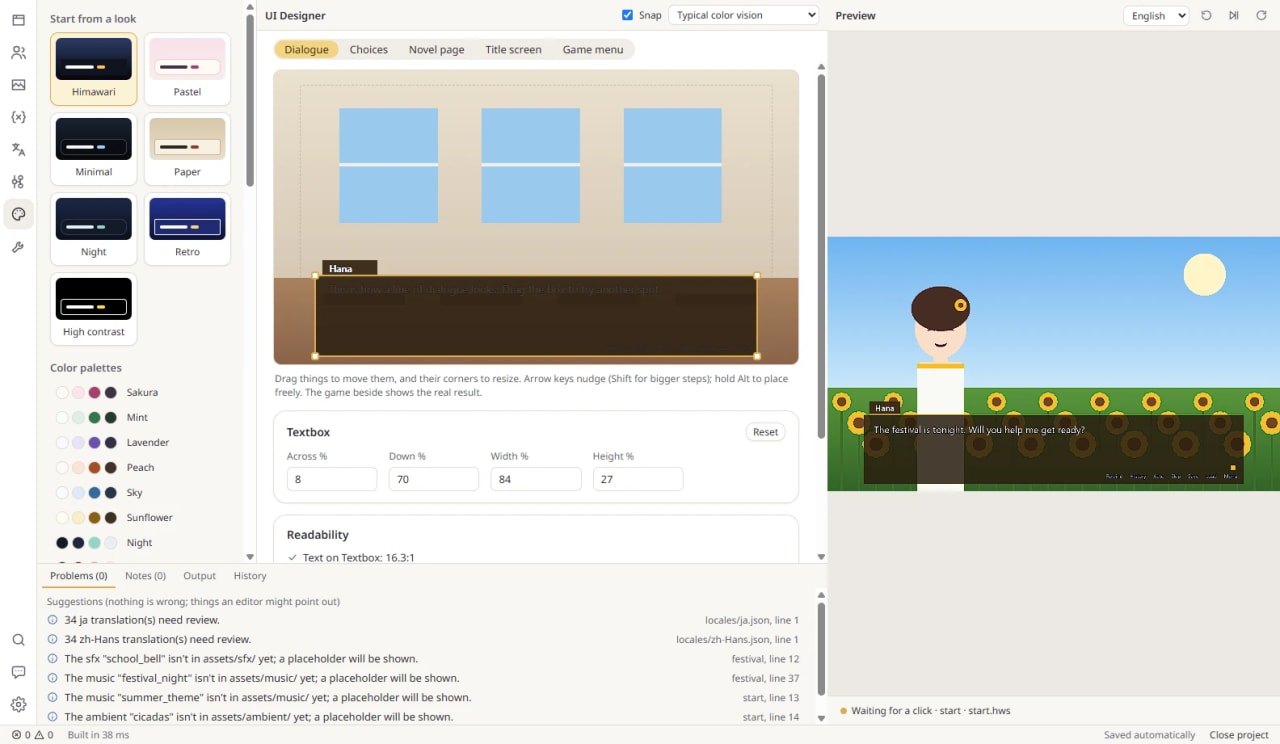
The UI Designer moves, resizes and recolours the textbox, choices and every menu on the running game, from seven presets, with a contrast check.
The UI Designer, on the running game. Bring in the art#
Layered character sprites with automatic blinking and lip-flap, Photoshop import, and labelled placeholders so the story plays before any art exists.
Translate it#
Add a language when you need one: every line gets a slot in a translation table, with CSV or XLIFF for other tools, and proper Japanese line breaking and furigana.
Never lose work#
Autosave, a history of every change, deletes that go to the Recycle Bin, and recovery after a crash or a power cut.
Export a tiny game#
One button makes a folder or a single .exe with the game's name and icon: about 3 MB before art and music, with saves, rollback, a backlog and accessibility settings built in.
Code, if you like#
Projects are plain-text .hws scenes that diff cleanly in git, with the hwc command-line tool, macros, and new statements written in C.
AI help, only if you want it#
Off until you turn it on. The assistant drafts, proofreads, checks continuity and translates; Claude Code can work through himawari-mcp. Every change is a proposal you accept.
Get started on the website#
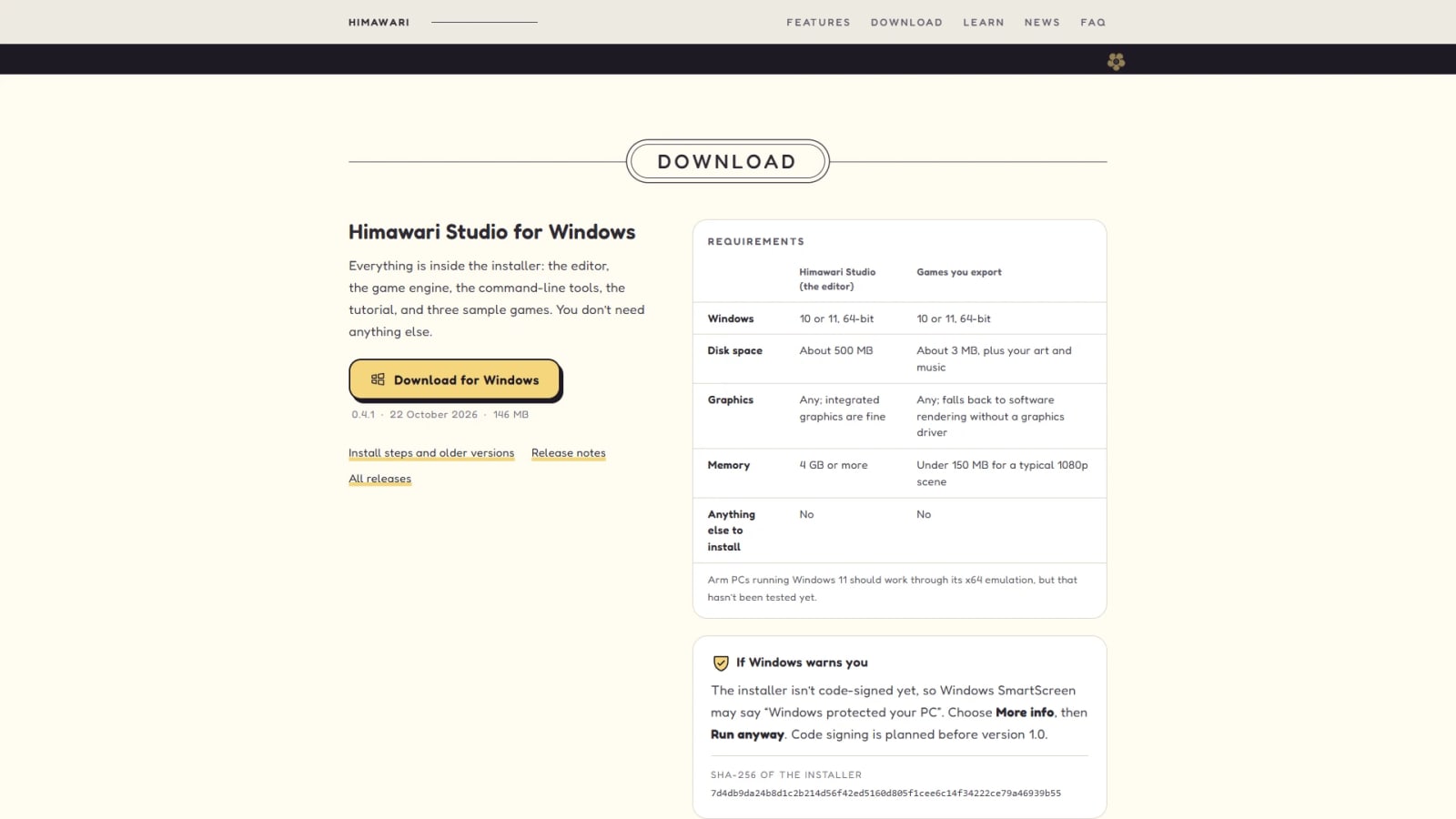
The website, in English and Japanese, has the download with its SHA-256, a guided first game, how-to guides and the news.
Website: download and requirements.
For admins
Write the news#
News in English and Japanese from the website's admin panel. Publishing rebuilds the static site through a deploy hook, live in about two minutes.
Sign in safely#
Argon2id passwords checked against known breaches, a lockout after five wrong tries, sessions that end after two idle hours, and a log of everything done.
Behind the scenes
One compiler for everything#
Studio, hwc and the AI tools share one compiler and checker, so they always agree. The engine never parses text: it plays compact, versioned bytecode.
Light enough for any PC#
The release build is about 2.6 MB with a hard 4 MB limit in CI, stays under 150 MB of memory, and falls back to software rendering without a graphics driver.
Broken on purpose#
Seven fuzz targets, AddressSanitizer and UndefinedBehaviorSanitizer runs, golden images and a break-it campaign: 14 bugs found, 13 fixed, each with a test.
Tested like a product#
A conformance suite where each case must compile to exact bytes in TypeScript and play to an exact transcript in C, end-to-end tests of Studio, and a generated 36,000-line game.
A website without trackers#
Static pages with no cookies and no third-party requests, hashed inline scripts in the CSP, under 40 KB of JavaScript per page, and a WCAG contrast check.
Always the latest release#
Each website build reads the newest release: version, date, installer size, SHA-256 and screenshots, and copies its documentation.
No.03Built with
Built with
02 Languages
- CThe game engine: C11, statically linked, about 3 MB, with no DLLs beyond Windows' own.
- TypeScriptThe compiler and checker, the command-line tool, the AI tools and Studio.
02 Frameworks
- ElectronHimawari Studio, the editor, with the real game docked in its preview pane.
- AstroThe website: static pages in English and Japanese, with docs copied from each release.
09 Libraries
- SDL 3Windows, input, audio and the GPU renderer (Direct3D 12 or Vulkan) for the engine.
- FreeTypeText rendering, with libunibreak line breaking for English and Japanese.
- ReactStudio's interface: the Screenplay view, the story graph, forms and the UI Designer.
- CodeMirrorThe Script view, with completion and checks from the shared compiler.
- Model Context Protocolhimawari-mcp: 25 tools that let Claude read, write, check and playtest a project.
- ZodValidates the input and output of every AI tool.
- PreactThe website's few interactive islands.
- Drizzle ORMThe website's schema and migrations.
- Argon2idPassword hashing for the website's admin panel.
01 Runtimes
- Node.jsRuns the compiler and the tools; hwc also ships as a standalone .exe.
01 Data
- NeonThe website's news and cookieless visit counts.
01 Cloud & hosting
- VercelHosts the website in Singapore (sin1) behind a strict Content-Security-Policy.
01 Services
- Claude APIThe optional built-in assistant, on the writer's own API key. Never images, music or voices.
06 Tools
- ViteBuilds Studio's interface.
- CMakeBuilds the engine with Ninja and MSYS2 GCC, and Clang for sanitizers and fuzzing.
- pnpmThe workspace of TypeScript packages.
- VitestMore than 500 unit and property tests across the packages and the website.
- PlaywrightDrives the real Studio app and every page of the website, with axe accessibility scans.
- GitHub ActionsBuilds and tests everything on Windows for every push, including seven fuzz targets.
No.04Gallery
Gallery
Himawari Studio: the screenplay beside the running game.
The UI Designer, on the running game.
Studio's dark theme.
Welcome: the tutorial is one click away.
Website: the hero.
Website: features for writers and artists.
Website: download and requirements.
Website: the three promises.
Website: where to learn.
Website: the first-game tutorial.
Website: in Japanese.
On a phone: home.
On a phone: features.
Access
Access
Keep exploring
More projects

Web platform
Aqua Iro Archive
A bilingual fan archive of Minato Aqua's six years (2018–2024), built like a visual novel: talk with her, travel through time and leave her a note.
- Astro
- Preact
- TypeScript
- CSS
- GSAP
- +15

Web platform
Moeko Works Portfolio
This portfolio itself: a pastel “Bloom Expo” site with video previews, story-like project pages, cookieless statistics and smooth motion.
- Next.js
- React
- TypeScript
- Material UI
- CSS
- +12
Web platform
Tsumugi
A production-management platform that follows every piece of work from why it started to what it became, on the web and on Android.
- JavaScript
- React
- Vite
- GSAP
- Lenis
- +10